“A quieter path from intention to command.”
ZIAL
PRECISION / INSTRUMENT · COMMAND COMPASS
Hold. Choose. Commit. Continue. ZIAL is a named command compass for Windows. It appears at the cursor, eight directions you actually use, then it disappears.
Instrument
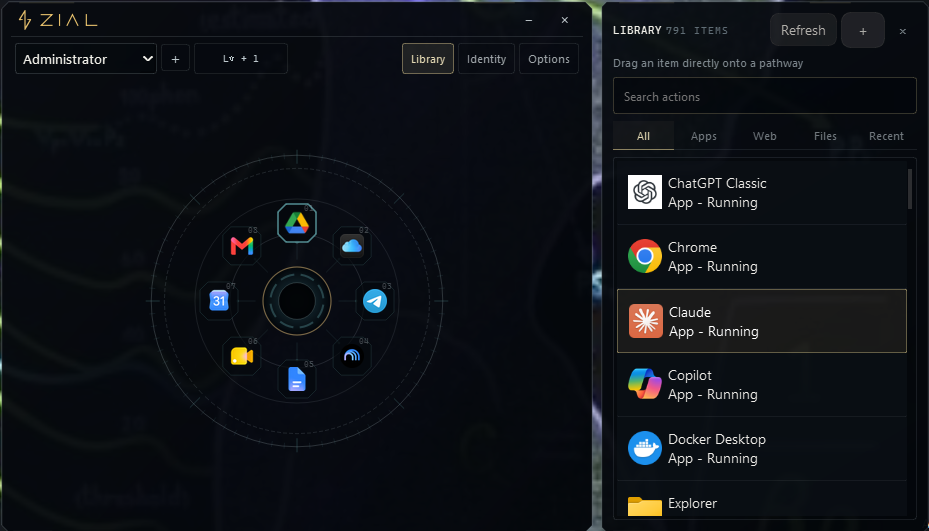
ZIAL is a Windows-first radial command system. Eight directions around the cursor. Each ZIAL is a named compass with its own gesture and look. It is not a launcher, not a dashboard, and not an agent.
What the operator does
- Summon with a keyboard shortcut
- Move toward a pathway — items bloom into view
- Commit to a binding — the action fires
- Release — ZIAL dismisses, the operator is back in their work
Compass identity
- 8 configurable pathways per profile
- Multiple profiles (Administrator, Agents, Code, Digi-Lab, etc.)
- 791+ indexed items across apps, files, web, and recent
- Accent, field, bloom, debloom, and core customization
Architecture
Beneath the radial surface: a Windows-native Python/PySide6 system composed of three coordinated executables—the launcher and hotkey owner, the Bloom overlay, and the Atelier configuration surface. Spatial memory, system-wide input handling, configurable pathway/binding data, Library indexing, and profile identity state are coordinated through Qt local IPC; Nuitka compiles the runtime surfaces for standalone delivery.
SURFACE
Radial compass · Pathway bloom · Action commit · Library panel · Identity panel · Options
ENGINE
Spatial memory · Native input handling · Profile management · Pathway binding model · Qt local IPC
PLATFORM
Windows desktop · System tray residence · Application registry index · File system crawl · Startup boot
Engineering
What was difficult. What decisions mattered.
Spatial memory as primary interaction
The entire design premise requires the operator to build muscle memory through repeated radial motion. The compass geometry had to be stable, predictable, and fast enough that spatial commitment becomes cheaper than conventional search.
System-wide keyboard interception on Windows
ZIAL must intercept a global shortcut and appear instantly, regardless of the currently focused application. This requires low-level Windows hooks and careful management of focus, z-order, and dismissal behavior.
Profile identity as behavioral personality
Different work contexts (administration, code, agents, resources) require different spatial configurations. The profile identity system lets each compass have its own accent, field, bloom behavior, core style, and pathway bindings — not just a color theme, but a behavioral personality.
Library indexing at scale
791+ items from multiple sources (installed applications, file system, web bookmarks, recent items) must be indexed, searchable, and draggable onto pathways. The Library must stay current without constant expensive re-scans.
Evidence
What exists
- ·Windows desktop application
- ·Radial spatial command surface
- ·8-pathway compass with binding/action identity
- ·Library panel (791+ indexed items)
- ·Profile identity system
- ·Daily operational use
What does not exist
- ·Public release
- ·macOS/Linux port
- ·Published documentation
Stack
Current State
Maturity
Near release
Current State
Daily-use product, near release
Last Verified
2026-08
Repository
Private (Zentraux Group)
Demo
Available on request
Source code is maintained in a private Zentraux Group repository. Architecture, implementation evidence, demonstrations, and selected technical artifacts are presented here.